
Python Type Checking
February 07, 2006 at 06:58 PM | categories: python | View CommentsOne of Python's strongest points is the fact that it is dynamically typed. That is, it does not force static type checking at compile time.
Take this simple, contrived, example written in Java, which is a statically typed language:
public Car getCar(File file) throws IOException
A lot of information is communicated in this statement. We know that it's public, what it returns (a Car object), that it requires a File object and that if it may raise an IOException exception if it fails. There is a lot to be said for being explicit like this. However, it is limiting as well. What if we wanted to get a Car from a string or from the network instead of from a File object? Well, we'd need to write another function. In addition to that, being that verbose takes a lot more time for me to write. Consider the alternative in python:
def getCar(input):
The second was a lot faster to write and will accept more inputs. For instance the input could be a file, the network, or a string, I just need to write different dispatching code depending on the input type. Most of the time, this means that I can spend less time jumbling with language semantics and get on with my life.
Then there are the other times. What happens when I pass the getCar function a new object that I haven't anticipated? In Java you'd never have this happen because when you compile your code it would realize that the object is not a File object. In Python though, the function takes ANY object and happily starts executing your function/method... that is until it does something to that object that it can't do. In Python you'll find the error at runtime whereas in Java you'll find the problem before it ever occurs, when you compile the program.
So, you can see why alot of Java and C/C++ programmers poo-poo Python. The question is, in the *real world* does this actually ever pose a problem? I really haven't seen an example of it.. Neither has Bruce Eckel. So if it isn't a problem in the real world, but only in hypothetical examples, does it really make sense for a language to force you to define your types Every.. Single.. Time.., thus making you spend more time on contingencies that most likely won't come up? I don't think so.
But... I have to sympathize somewhat with those programmers that DO think about those "hypothetical" examples where it really does matter, because I'm one of those programmers.
Python is all about liberty. Python will let you do things YOUR way. If you want to force people to only use a certain type of object in your functions, you can do it. Yesterday I found a very nice module that does exactly this: The
>>> from typecheck import accepts
>>> @accepts(int)
... def intFunction(a):
... print a
...
>>> intFunction(1)
1
>>> intFunction("something different")
Traceback (most recent call last):
File "<stdin>", line 1, in ?
File "/usr/lib64/python2.4/site-packages/PIL/__init__.py", line 1271, in fake_function

File "/usr/lib64/python2.4/site-packages/PIL/__init__.py", line 1392, in __check_args

typecheck.TypeCheckError: Argument a: for something different, expected <type 'int'>, got <type 'str'>;
>>>
It's still not compile time type checking (you don't explicitly compile Python anyhow), but you do prevent the function from ever running if the function doesn't pass your accepts() filter.
The above example is only the most basic form of runtime type checking. The
Type checking could be a powerful tool in finding bugs in programs. The really nice thing about using this as a module, instead of a language requirement, is that I can do my type checking almost as an afterthought. In no way does it impede my programming style or speed.
ECSniff 0.6 released
January 17, 2006 at 11:56 PM | categories: python, security | View CommentsI've just made an update to the Enigma Curry Network Sniffer.
Version 0.6 includes the following changes:
- MSN instant message logging
- FTP authentication logging
- HTTP web page access logging
- Subnet Filtering
ECSniff - Introducing the Enigma Curry Network Sniffer
January 13, 2006 at 01:59 AM | categories: python, security | View CommentsI was talking to my friend Gandhi today. He's taking a really lame computer networking class this semester in order to fulfill graduation requirements. He's confident that he won't be learning a thing in the class.
This worries me a bit. I was told by one of my professors a few years ago that I would not need to take this class. Now Gandhi is being forced into it. Despite my having several years of experience in the field already, soon, I too may be forced into answering questions like "What is an IP address?" or even worse "How does the Internet make our lives easier?"....... shudder and shudder.
Maybe I can prove to them that I really don't need to take the class. I thought of showing them a picture of the server room at work. We have a little under 70 computers in there. All networked and maintained by me. Then again, maybe they think the class will teach me "the deep internals of networking" or something equally untrue of the class. So, I thought if push comes to shove, I'd show them that I can find anyone's email password on the network (assuming I have physical access of course)
So without further ado, here is the Enigma Curry Network Sniffer.
This software is by no means original. There are umpteen different other programs out there that will do similar things. I wrote this one, however, by only reading the RFC documents available on the various protocols used. I wanted to make sure that I knew much more than will ever be taught in this dumb IS course. Plus, it was pretty fun to write.
Right now this software only does two things. It will scan the local network for connections to POP3 email servers and HTTP servers using Basic Authentication. Anytime someone on the network uses one of these very insecure protocols, it will display their username and password on the screen of the person running this program. You can also leave the program running and log the results to a file. For future versions, I think it would be fun to explore some instant messaging protocols like MSN... it would be fun to prove the necessity to some of my friends and coworkers of using Gaim-Encryption.
Go download the software if you'd like to try it out, but please don't get yourself into trouble! I take no responsibility for your actions.
ECSniff: The EnigmaCurry Network Sniffer
January 13, 2006 at 12:07 AM | categories: python, software | View CommentsContents
OverviewFeatures
Requirements
Command line options
Example Usage
FAQ
Revision History
Overview:
This is my take on a network sniffer. It allows you to see interesting data that is on your network. Not just the data that is intended for your computer but for other computers on the same LAN as well. So far, this has only been tested on Gentoo Linux x86_64, but should work on any platform that supports Python as well as libpcap (Most Linux distros already have this installed) or Winpcap (for windows).
This software is intended for educational purposes. Nevertheless, usage is granted to anyone under the terms of the GNU General Public Licence version 2. What you do with it, as well as the consequences of using it, is your own responsibility.
Features:
Version 0.6 has the following features:
- Log HTTP web page accessess
- Log HTTP authentication attempts (username and password)
- Log MSN instant messages
- Log POP3 email authentication attempts (username and password)
- Log FTP authentication attempts (username and password)
- Subnet filtering -- This allows you to stay out of trouble by only logging some computers
- Write all log info to a file for later analysis
Requirements:
- Python 2.4 (haven't tested older versions)
- Pylibpcap
- Libpcap or Winpcap
Download:
ECSniff.0.6.tar.gz- version 0.6 released Jan 18 2006- Moved over to github -- Note, I'm not working on this project any longer. This is more of a code dump than anything else.
Command line options
options:
  --version             show program's version number and exit
  -h, --help            show this help message and exit
  --subnet=IP/netmask   Only display data for a specific subnet. eg:
                        192.168.0.1/24 or 192.168.0.1/255.255.255.0
  --pop3                Log POP3 usernames and passwords
  --httpauth            Log HTTP usernames and passwords
  --http                Log HTTP/WWW page accesses
  --msn                 Log MSN messenger messages
  --ftp                 Log FTP usernames and passwords
  -e, --everything      Log Everything
  -d device, --device=device
                        device to sniff (eth0, wlan0 etc)
  -l file, --log=file   log results to file
  -q, --quiet           don't display events on stdout
Example Usage:
These examples assume you are running Linux. Linux requires you to have root access in order to log data from the network device. So do the following commands as root or with the sudo command. In these examples, wlan0 is my network device. Change the devicename to whatever device you want to examine (eth0 is usual).
Log all POP3 email connections:
./ecsniff.py -d wlan0 --pop3
Log all HTTP web page accesses and also log HTTP Basic Authentication attempts:
./ecsniff.py -d wlan0 --http --httpauth
Log all MSN messages making sure to only log messages in and out of a particular machine with a local IP address of 192.168.1.50:
./ecsniff.py -d wlan0 --msn --subnet=192.168.1.50/32
Subnet filtering is a very important feature. It can be illegal for you to log network traffic of computers that you are not the legal user of. By default, ecsniff will log all packets regardless of their source or destination. By specifying a subnet, you can limit which IP addresses are logged. With subnet filter turned on, all packets that are logged will either be from the specified subnet or be destined to that subnet.
Log Everything (that ecsniff is desinged for) from the local lan (subnet 192.168.0.0 netmask 255.255.255.0)
./ecsniff.py -d wlan0 --everything --subnet=192.168.0.0/255.255.255.0
You can specify the subnet using either the full netmask (255.255.255.0) or by it's shorthand (like in the example before)
If you are unfamiliar with netmask shorthand see this page
FAQ
Is this a hacker tool and is it illegal?
The purpose of this program is to be a DEMONSTRATION that we still use some pretty insecure protocols these days. It is is probably useful to the script-kiddie as well, but that is not my intention. In some countries it is illegal to eavesdrop on communication that is not your own. So don't go eavesdropping on other people's business!
I don't want to break the law, how can I just look at MY network traffic?
If you want to stay out of trouble, use the --subnet option. For instance if your local IP address is 192.168.0.2 and you only want to log your own traffic use the option "--subnet=192.168.0.2/32". You won't see any one else's traffic but your own.
How can I avoid being a victim of this or similar programs?
Use encryption! Don't use any network protocol that sends information in plain-text for transmitting information that you think is important. For email, use the GNU Privacy Guard with SSL for authentication. For instant messaging, use Gaim with Gaim-Encryption (works on all networks, MSN, Yahoo, AIM etc). For Websites that ask for a password, always make sure that SSL is enabled, if you don't see the lock icon, don't use that website... and never, ever, use Telnet.
I am trying to see traffic on my LAN, but I can't see any other traffic but my own.
In order to be able to see other computer's traffic you have to physically be on the same network segment. Traditionally, when you network computers together using a hub, every computer hooked into that hub (or secondary hubs that are plugged into it) are all on the same segment. Today, more often than not, we use switches not hubs. A switched network uses a unique network segment for each port on the switch. This is done for two reasons: 1) The network is faster if data only has to travel to the intended recipient and 2) People realized that hubs were a major security risk in that anyone could sniff out other people's data (as this program shows).
Even if you are on a switched network, however, you can still sniff the data from all computers if you have physical access to the network equipment. You can use a switch that has a 'port mirror'. A switch that has such a feature will allow you to replicate all traffic on one port (or on a good switch, from all ports) to any other port. In this sense the switch acts like a hub, but only on one specific port (the port you'll use for the sniffing).
Another option, if your switch doesn't support port mirroring, is an ethernet tap. An ethernet tap is something you plug in line with your gateway. All traffic goes through normally, but it also allows you to sniff data right off the line. Here are some instructions for building one very inexpensively. The real nice thing about this particular network tap is that it is completely passive; the transmit lines on the sniffer computer don't go anywhere, so the sniffer computer just "sees" the data that is on the line and cannot "touch" the data or add new data. So, with a tap, no one will find your sniffer, that is, unless they physically find the tap.
One caveat about a tap is that it seperates the full duplex communication into two half duplex signals on two ports. So you have one port having everything sent by Computer A and the second port everything from Computer B. If you want to analyze both Receving and Transmitting on one interface (which currently this program requires) you need to consolidate the two signals back into one. You can use a switch that has port spanning capabilities to do this.
See the Ethereal Capture Setup page for more setups that allow packet capture on switched networks.
Revision history:
- 0.6 - Jan 18, 2006 - Now includes MSN messenger logging, HTTP web page access logging, FTP authentication logging, and Subnet filtering. Licencing information is more explicit. Things are more organized in seperate .py files.
- 0.5 - Jan 13, 2006 - Initial Release. Can scan for pop3 email username and password as well as HTTP Basic Authentications.
Yep, I'm a nerd
January 11, 2006 at 12:36 PM | categories: python, geek humor | View CommentsI was just reading today's Foxtrot.
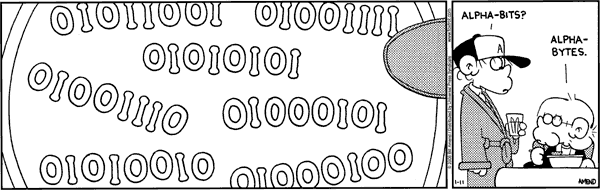
Check this out:
bin = ['01011001','01001111','01010101',
       '01001110','01000101','01010010','01000100']
for b in bin:
   print chr(int(b,2)),
I Love comics that are made just for me. :)
« Previous Page -- Next Page »
Contact me
Friends
- brainjack>>
- Duane McGuire - My Dad
- Erin McGuire - My Sister
- Heavy Noir
- OneWatt
- Six Mile Village

Liberty Links
Categories
- android (rss) (1)
- backups (rss) (1)
- blogofile (rss) (1)
- car computer (rss) (1)
- cats (rss) (1)
- class work (rss) (1)
- cool stuff (rss) (9)
- curlbomb (rss) (1)
- diy (rss) (1)
- economics (rss) (2)
- electronics (rss) (1)
- emacs (rss) (13)
- enigma curry (rss) (8)
- enigmacurry.com (rss) (1)
- free state project (rss) (3)
- games (rss) (1)
- geek humor (rss) (3)
- geeky (rss) (2)
- gmail (rss) (1)
- gnome (rss) (1)
- hd-dvd (rss) (2)
- humor (rss) (2)
- java (rss) (3)
- letters (rss) (2)
- liberty rants (rss) (42)
- linux (rss) (20)
- lisp (rss) (1)
- michael badnarik (rss) (2)
- mitt romney (rss) (3)
- music (rss) (1)
- n800 (rss) (1)
- openoffice.org (rss) (1)
- php (rss) (1)
- pissed off (rss) (3)
- python (rss) (31)
- ron paul (rss) (9)
- security (rss) (5)
- software (rss) (1)
- stupidity (rss) (4)
- uncategorized (rss) (6)
- videos (rss) (9)
Archives
- May 2016 (1)
- July 2011 (1)
- September 2010 (1)
- July 2010 (2)
- April 2010 (1)
- January 2010 (1)
- December 2009 (1)
- July 2009 (1)
- May 2009 (2)
- March 2009 (1)
- January 2009 (4)
- December 2008 (3)
- November 2008 (2)
- October 2008 (1)
- September 2008 (1)
- August 2008 (3)
- July 2008 (1)
- May 2008 (2)
- April 2008 (2)
- March 2008 (1)
- February 2008 (2)
- January 2008 (1)
- December 2007 (1)
- November 2007 (5)
- October 2007 (7)
- September 2007 (3)
- July 2007 (3)
- June 2007 (3)
- May 2007 (3)
- April 2007 (3)
- February 2007 (2)
- November 2006 (1)
- October 2006 (3)
- July 2006 (1)
- June 2006 (1)
- May 2006 (2)
- April 2006 (10)
- February 2006 (2)
- January 2006 (6)
- December 2005 (1)
- November 2005 (5)
- October 2005 (3)
- September 2005 (2)
- August 2005 (5)
- July 2005 (1)
- June 2005 (2)
- May 2005 (7)