
Resizing a LUKS / DM-Crypt / cryptsetup filesystem
April 28, 2007 at 06:26 PM | categories: linux, uncategorized | View CommentsI run Gentoo linux on my laptop. I love it because it's based on a constantly updated rolling release which means I get all the latest software when I want it. One of the side benefits of running Gentoo is that I get to do all of the cool linuxy stuff before the other distros get it: Like encrypting my entire root filesystem.
I used to be running Edgy Eft on my laptop before deciding to go back to Gentoo. So I only installed Gentoo on a 20GB partition and left Edgy in a 60GB partitition. I find myself using Gentoo 100% of the time and have all but abandoned Edgy on the laptop (I have nothing against Ubuntu by the way, it's great, and I maintain several other Ubuntu machines).
So, now that I have a few hours spare time today, it was time to get rid of Edgy and resize the Gentoo filesystem to use the entire hard drive. This is usually done with a fine tool like Gparted, but since this is an encrypted filesystem it's not quite that easy.
First things first, backup the partition to another machine:
Run netcat on another machine where you want to store your backup:
nc -l -p 80000 > /path/to/backups/your_image_name.img
Now on the machine you want to backup (substitute sda1 with your partition name):
dd if=/dev/sda1 | nc hostname_of_2nd_machine 80000
This will transfer an image of the partition to the second machine at an incredibly fast speed (I love netcat!)
Resize the partition:Boot up on your Gentoo Live CD.
Run fdisk (or your favorite clone), and jot down the start and end block of the partition you want to keep. In my case it was the first partition and it was on block 1.
Now delete all of the partitions you want to delete as well as the encrypted partition. "WTF?" I hear you say? Yes, that's right, DELETE the encrypted partition. This doesn't actually delete any data mind you, and as long as you correctly remembered the start and end block of the partition you are perfectly safe in doing this.
Now create a NEW partition with the same start block as you originally had. Make the end block anything larger than the original end block. Save your changes.
What we've done at this point is resized the partition which is only part of what we need. We now need to resize the filesystem contained inside the partition.
Now decrypt/map your encrypted partiton however you do it. In my case I do the following:
gpg --decrypt key.gpg 2>/dev/null | cryptsetup luksOpen /dev/sda1 root
Run fsck on it:
fsck -f /dev/mapper/root
And resize it with an appropriate tool (like ext2resize for ext3)
resize2fs /dev/mapper/root
resize2fs will resize the filesystem to the size of the containing partition.
And you're done. Reboot your machine and you'll have more hard drive space available.
Michael Badnarik has a new radio show!
April 23, 2007 at 08:46 AM | categories: cool stuff, michael badnarik | View Comments
I got an email this morning from one of my favorite liberty activists: Michael Badnarik. Michael has been wrapping up a very rigourous campaign for US Congress and so we haven't heard much from him lately. But he is back and sounding better than ever!
Michael began today with his new show Lighting the Fires of Liberty on the We the People Radio Network. I wish Michael the best of luck, I feel that being an educator is one of his best roles and he will do extremely well, I'm sure of it.
Check his out podcast today!
Python vs Java
April 20, 2007 at 11:24 PM | categories: python, java | View CommentsI've been coding in Python for two years now. I've recently been reteaching myself Java because some projects I'm working on require it. So far, about the only fun thing about it has been setting up Emacs abbreviations to handle all of Java's verbose syntax. I am simply amazed at how verbose Java is! Just to illustrate my frustration I coded one of the exercises I was working on in Java as well as in Python:
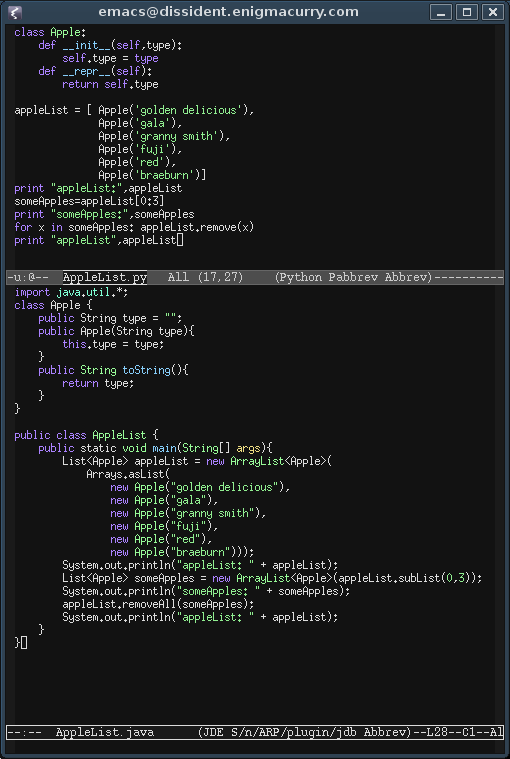
Yes, both of these code samples do the exact same thing.
On the top is Python. 17 lines of very readable code. On the bottom, weighing in at 28 lines, is Java. Brackets and semicolons are everywhere -- Redundant type declarations and "new" object instantiations -- No syntactic sugar in sight except for the "+" operator that I'm not even allowed to overload myself!
I even think I'm being a bit generous to Java, in the way I've formatted the above code, I've only used a newline when I thought it adds to the readability. You'll note that I closed three whole blocks of code on line 23 instead of on separate lines. Yea, I could start doing this everywhere else to save space but that starts to make the readability of the code much worse than it already is.
Sure, Java is a fine language, it certainly has a long life still ahead of it and will continue to grow and mature... but coming down from a two year long 'Python high' and coming back to Java is.. well.. less than thrilling.
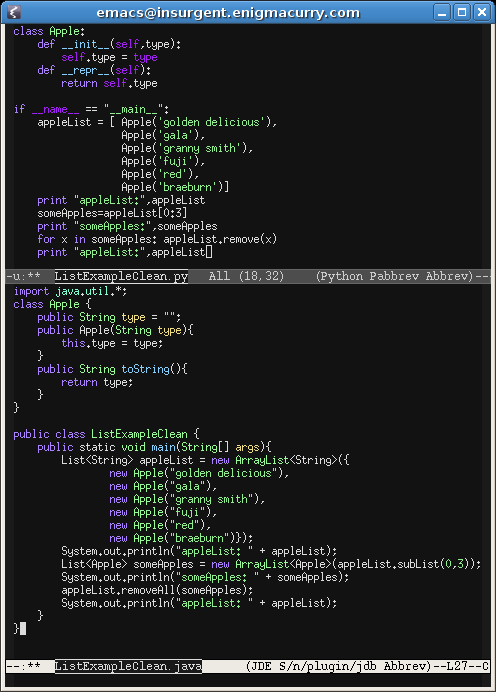
Update: The original java code had newbie-esque syntactical errors that prevented compilation as well as a much larger technical problem: when using an Array as the input for an ArrayList it changes the behaviour of the ArrayList such that it is fixed length meaning it no longer implements a removeAll() method (nor even an add() method, what's a list if you can't add items?!?) Wrapping a Array.asList inside of the ArrayList fixes it, but logically adds yet another line of code and further obfuscates things.
GNOME: kiosk mode (make any app fullscreen)
February 17, 2007 at 01:07 PM | categories: gnome, linux | View CommentsI seem to remember a long time ago that GNOME had a user definable shortcut that could make any application fullscreen. I can't seem to find that in the Gnome keyboard shortcuts dialog anymore.
Update: I have since found the functionality and thus invalidated this entire post! When will GNOME learn to make things more obvious?? The short answer: Set a keybinding for /apps/metacity/window_keybindings/toggle_fullscreen in gconf-editor.
Also, if you're using Beryl instead of metacity, this option is reasonably easy to find in the beryl settings manager: "General Options"->"Shortcuts"->"General Options"->"Bindings"->"Toggle Window Fullscreen"
I like GNOME, I really do. But it's typical of the developers to hide useful things like this. Sure, it unclutters the preference dialogs.. but it sure would be nice to be able to do what should be (and even once was) simple, useful things.
Anyway, I've found a way to get that functionality back. Download wmctrl from your package manager and then do the following:
- Run "gconf-editor" as your normal user
- find Apps->metacity->general_keybindings
- Find the entry called run_command1 (or any other number that is blank)
- Enter "<Alt>F11" for a value. You can use any shortcut combination you want, it's just that a lot of applications have F11 has an inbuilt key for fullscreen mode, so Alt-F11 seems like a good shortcut for every other application while still not being a common keystroke that might interfere with others.
- Now find Apps->metacity->keybinding_commands (it's directly below general_keybindings)
- For command_1 enter "wmctrl -r :SELECT: -b toggle,fullscreen"
- Close gconf-editor
After all that, you should understand my frustration with GNOME. GNOME used to have a simple way of making custom keybindings too, and now it's tucked away in a really complex regedit style interface. Disgusting really.
Anyway, if you followed all of that, you should now be able to press Alt-F11 and you'll get little crosshairs for your mouse cursor. Click any window with those cross hairs and it will make it fullscreen. Press Alt-F11 and click the window once more and it will return to the original size it was beforehand.
Lazy Gigolo Asses
February 09, 2007 at 09:18 PM | categories: uncategorized | View CommentsIt's science! According to the March issue of Discover Magazine, in a column entitled "20 things you didn't know about bees," overcrowded bee hives are filled with 'lazy gigolo asses'... and you know what? I DIDN'T know that!
Here's the excerpt:
Drones - the male honey bees - live only for mating with the queen. If there is a shortage of food in the hive, the workers kick their lazy gigolo asses out.
Seriously though, I think that this must have been a filler line put in by the author because she didn't know how else to say it, but knowing that she would come up with something else before she submitted it. Looks like she forgot as the rest of the article is void of humor.
(First post since November! I need to get my lazy gigolo ass blogging again.)
« Previous Page -- Next Page »
Contact me
Friends
- brainjack>>
- Duane McGuire - My Dad
- Erin McGuire - My Sister
- Heavy Noir
- OneWatt
- Six Mile Village

Liberty Links
Categories
- android (rss) (1)
- backups (rss) (1)
- blogofile (rss) (1)
- car computer (rss) (1)
- cats (rss) (1)
- class work (rss) (1)
- cool stuff (rss) (9)
- curlbomb (rss) (1)
- diy (rss) (1)
- economics (rss) (2)
- electronics (rss) (1)
- emacs (rss) (13)
- enigma curry (rss) (8)
- enigmacurry.com (rss) (1)
- free state project (rss) (3)
- games (rss) (1)
- geek humor (rss) (3)
- geeky (rss) (2)
- gmail (rss) (1)
- gnome (rss) (1)
- hd-dvd (rss) (2)
- humor (rss) (2)
- java (rss) (3)
- letters (rss) (2)
- liberty rants (rss) (42)
- linux (rss) (20)
- lisp (rss) (1)
- michael badnarik (rss) (2)
- mitt romney (rss) (3)
- music (rss) (1)
- n800 (rss) (1)
- openoffice.org (rss) (1)
- php (rss) (1)
- pissed off (rss) (3)
- python (rss) (31)
- ron paul (rss) (9)
- security (rss) (5)
- software (rss) (1)
- stupidity (rss) (4)
- uncategorized (rss) (6)
- videos (rss) (9)
Archives
- May 2016 (1)
- July 2011 (1)
- September 2010 (1)
- July 2010 (2)
- April 2010 (1)
- January 2010 (1)
- December 2009 (1)
- July 2009 (1)
- May 2009 (2)
- March 2009 (1)
- January 2009 (4)
- December 2008 (3)
- November 2008 (2)
- October 2008 (1)
- September 2008 (1)
- August 2008 (3)
- July 2008 (1)
- May 2008 (2)
- April 2008 (2)
- March 2008 (1)
- February 2008 (2)
- January 2008 (1)
- December 2007 (1)
- November 2007 (5)
- October 2007 (7)
- September 2007 (3)
- July 2007 (3)
- June 2007 (3)
- May 2007 (3)
- April 2007 (3)
- February 2007 (2)
- November 2006 (1)
- October 2006 (3)
- July 2006 (1)
- June 2006 (1)
- May 2006 (2)
- April 2006 (10)
- February 2006 (2)
- January 2006 (6)
- December 2005 (1)
- November 2005 (5)
- October 2005 (3)
- September 2005 (2)
- August 2005 (5)
- July 2005 (1)
- June 2005 (2)
- May 2005 (7)